Review Comments (0) Screenshots (3) Questions & Answers (0) Votes (1) Awards (2) Wiki  
(1)
MyDesktopHelp.Com
1.0
mydesktophelp.com
Freeware
19 people
Download ...

338.08 KBDownloaded 370 times

This software was checked for viruses 3 months ago and was found to contain no viruses.
Click here to see antivirus report.
 

Review

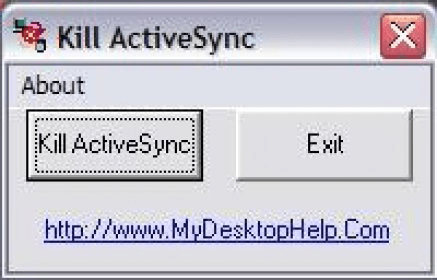
This program kills the Microsoft AcitveSync icon from the system try. It creates two shortcuts in the desktop automatically: Auto Kill ActiveSync and Kill ActiveSync.

Auto Kill ActiveSync closes the Microsoft ActiveSync icon from the system try directly without opening any window.

The other icon (Kill ActiveSync) will open the main window with two buttons:

1. The Kill Activesync button closes the icon of Microsoft ActiveSync from the system try.
2. The button Exit closes the Kill ActiveSync application.

The only option from the menu bar is “About”. It will show About Kill ActiveSync but it has the button option to view the system information of the computer, where you can view the general information about your computer and its operating system.

If the main window of Microsoft ActiveSync is opened or minimized the try icon will disappear but the application of Microsoft ActiveSync will be still running.

Microsoft ActiveSync icon can be executed again at any time without problem and the icon from the system try will show up again.

The file downloaded must be unzipped and executed to install the application
  • If Microsoft ActiveSync is killed, the application can be executed again at any time without problem and the icon from the system try will show up again
  • If the main window of Microsoft ActiveSync is opened or minimized the try icon will disappear at the moment of killing it but the application will be still running.

Reviewed by: Roberto Jimenez

Reviewer rating:

Reviewed: 3 years ago

Report a wrong version Report a wrong program title Suggest a correction

Screenshots

main page main page About Kill Activesync About Kill Activesync Microsoft ActiveSync Microsoft ActiveSync

Latest comments


There are no comments, be the first one!
Add new comment

E-mail Address:

Password:

Register now »

Forgot password?

Sign in with:
Download Software Informer Client
Copyright © 2012, Informer Technologies, Inc. About| Privacy and terms| Help| Feedback & Support| Partners program